If you are always looking for new apps for live channel streaming on Android TV and mobile, Ag Stream is one of those apps worth checking out. It comes with a large selection of channels, including some with very good quality and even high-quality streams.
The app is presented as a simple option for anyone who wants quick access to entertainment without dealing with activation codes. The setup is straightforward, and once installed correctly, it can be used normally after a few basic steps.
Table of Contents
- 📺 What Ag Stream offers
- ⬇️ How to download Ag Stream with Downloader
- ⚙️ Setup is simple and does not require an activation code
- 🎛️ Channel switching inside the built-in player
- 💾 Check your storage before installing
- 📝 What to keep in mind before trying Ag Stream
- ❓FAQ
📺 What Ag Stream offers
The main appeal of Ag Stream is simple: it is a streaming app that includes many channels, with a mix of good and high-quality playback options.
It is designed for:
Android TV screens
Phones
Many TV-based Android devices
There is one important note here. The app may not work on some Box TV devices. However, it is also clearly stated that on most devices, it does work. So if you are using an Android-based TV system, there is a good chance it will run properly, but compatibility is not guaranteed on every box.
⬇️ How to download Ag Stream with Downloader
The installation method shown is through the Downloader app. Instead of searching around manually, the process uses a direct code.
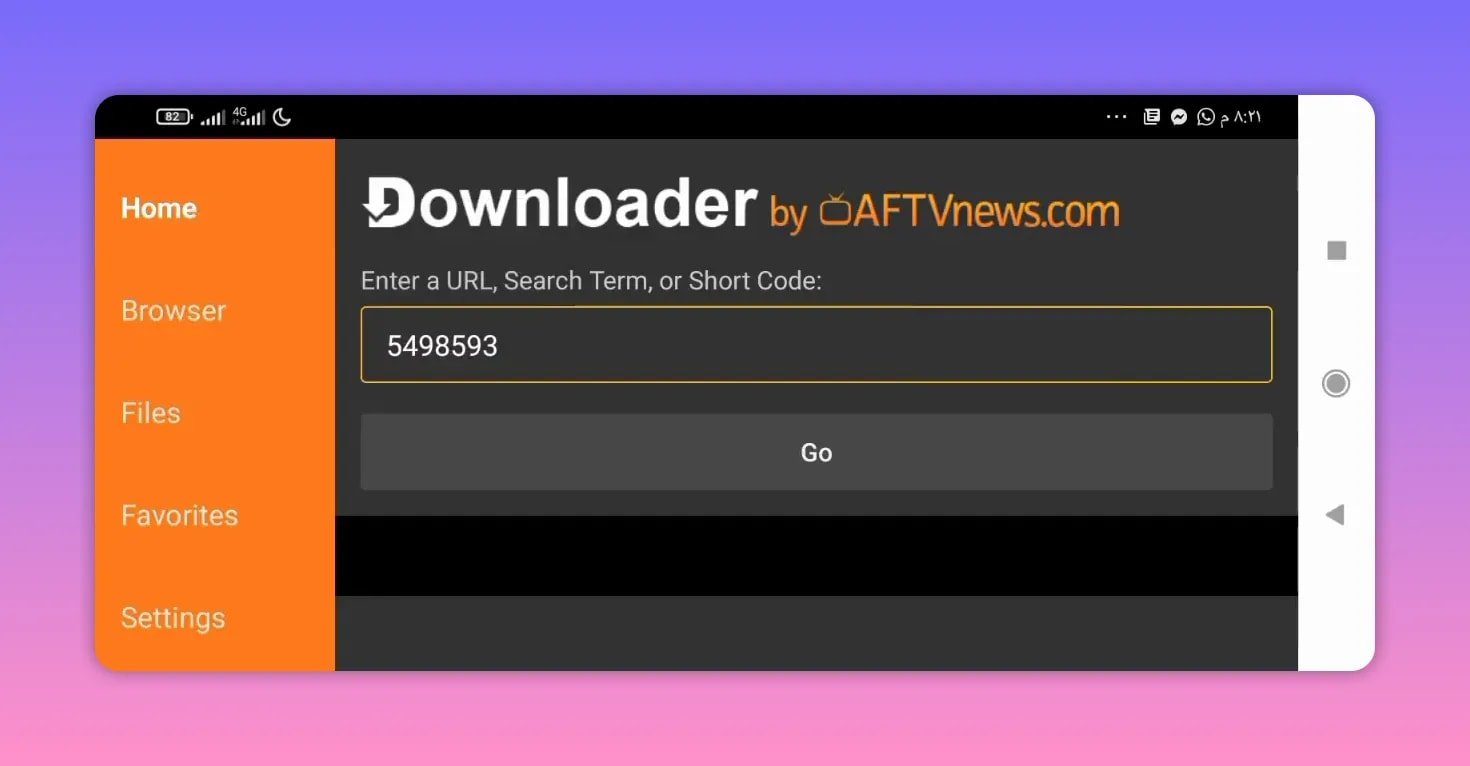
To download the app, enter this code in Downloader:
5498593
After entering the code, continue with the download process. The link redirects to MediaFire, where the app file can be selected and downloaded.
Download steps
Open the Downloader app on your device.
Type the code 5498593.
Proceed to the download page.
On the MediaFire page, tap the app name.
The file should begin downloading automatically.
⚙️ Setup is simple and does not require an activation code
One of the best parts about this app is that it does not require an activation code. That removes one of the most annoying parts of trying new streaming apps.
Once the app is opened for the first time, there are just a few setup prompts to deal with. The process is described as very simple:
Open the app
Skip a few initial steps or prompts
The app then opens normally
That means there is no need for extra registration or manual activation before getting into the content.
🎛️ Channel switching inside the built-in player
Another useful point is that channel switching can be done from inside the player itself. That makes the experience easier, especially on TV devices where simple navigation matters a lot.
Instead of exiting and reloading menus repeatedly, the app allows channel changes directly through the playback interface. For people who prefer a smooth, remote-friendly experience, that is a practical advantage.
💾 Check your storage before installing
There is one thing to keep in mind before downloading: the app size is relatively large.
If your device storage is nearly full, you may need to free up some memory first. This is especially important on Android TV boxes and older streaming devices, where available internal storage can be limited.
Before installation, it is a good idea to:
Delete unused apps
Clear unnecessary cached files
Make sure there is enough free space for the APK
📝 What to keep in mind before trying Ag Stream
Ag Stream is presented as a strong option for anyone interested in a new entertainment app with a wide channel lineup. The main strengths highlighted are:
A large number of channels
Good to high stream quality
No activation code required
Simple setup after installation
Channel switching from inside the player
The two practical limitations to keep in mind are also clear:
It may not work on some Box TV devices
It has a fairly large file size, so storage space matters
If your device has enough memory and supports the app properly, Ag Stream looks like a convenient choice for entertainment on Android TV and mobile.
❓FAQ
What is Ag Stream?
Ag Stream is a streaming app for Android TV and phones that includes many channels, with some streams available in good and high quality.
Does Ag Stream work on Box TV devices?
It may not work on some Box TV devices. However, it is said to work on most devices, so compatibility depends on the hardware and system.
How do I download Ag Stream?
Use the Downloader app and enter the code 5498593. This should direct you to a MediaFire page where you can tap the app name and begin the download.
Does Ag Stream need an activation code?
No. The app does not require an activation code. After opening it, you only need to skip a few initial steps and it should start normally.
Can I change channels from inside the player?
Yes. One of the useful features mentioned is the ability to change channels directly within the built-in player.
Is the app large in size?
Yes. The app is described as somewhat large, so it is important to make sure your device has enough free storage before installing it.
Is Ag Stream suitable for Android TV?
Yes. It is specifically presented as an app for Android TV screens as well as phones, making it suitable for people who use TV-based Android systems.